App Settings
Configure your ELMS app settings by modifying the values in lib/core/configs/app_settings.dart.
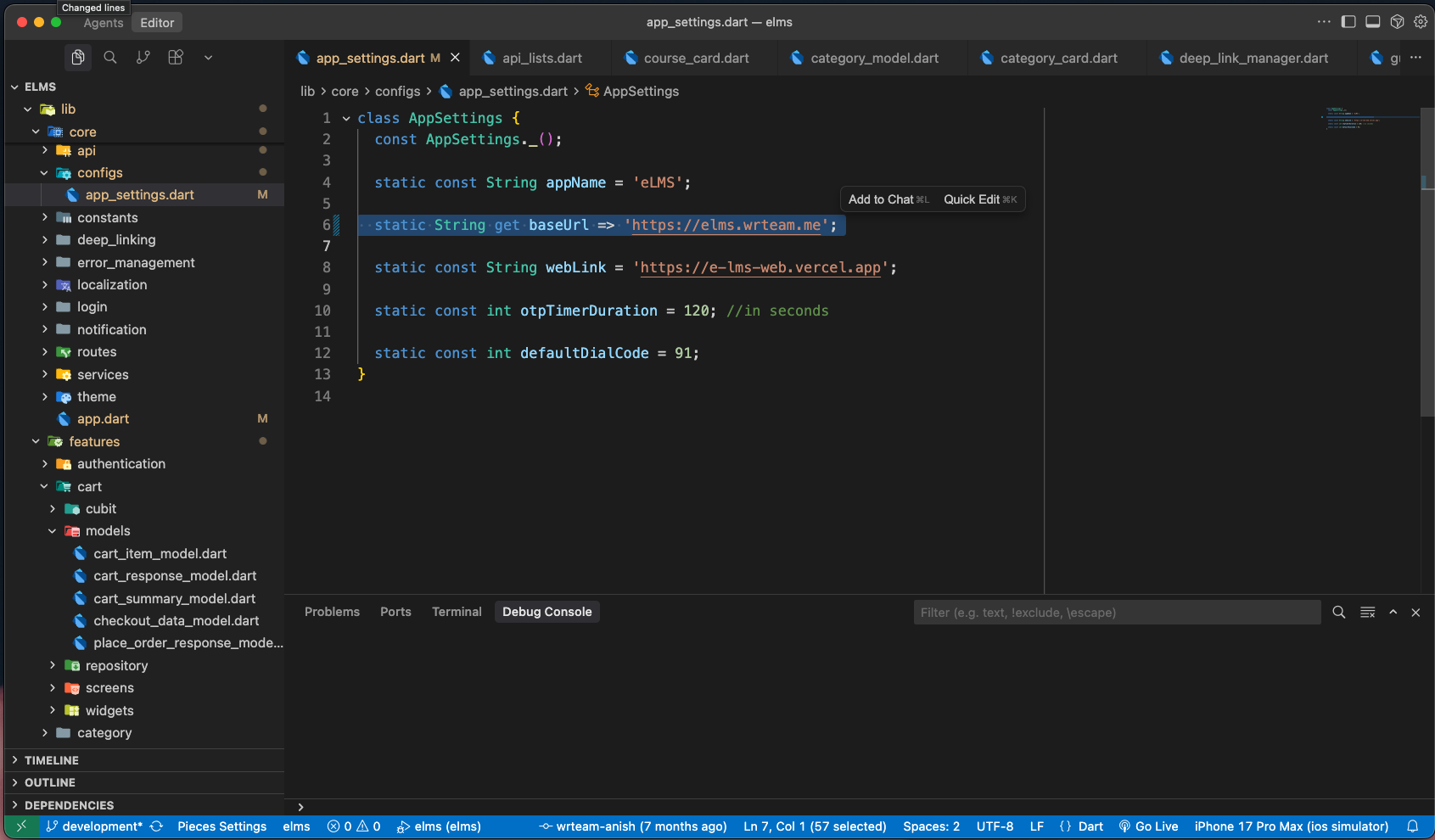
Configuration File Location
lib/core/configs/app_settings.dart
Available Settings
1. App Name
static const String appName = 'eLMS';
Description: The display name of your application.
Usage:
- Used throughout the app for branding
- Displayed in app title bars and navigation
- Referenced in
lib/core/app.dartfor the MaterialApp title
How to Change:
static const String appName = 'Your App Name';
Example:
static const String appName = 'My Learning Platform';
2. Base URL (Backend API)
static String get baseUrl => 'https://elms.wrteam.me';
Description: The base URL of your backend server/admin panel. This is the primary server endpoint that the app connects to for all API calls.
Usage:
- All API requests are made to this URL
- Used by the API client in
lib/core/api/api_client.dart - Critical for app functionality - the app cannot work without a valid backend URL
How to Change:
static String get baseUrl => 'https://your-domain.com';
Examples:
// Production server
static String get baseUrl => 'https://api.mylearningapp.com';

// Staging server
static String get baseUrl => 'https://staging-api.mylearningapp.com';

// Local development server
static String get baseUrl => 'http://192.168.1.100:8000';

// Local emulator (Android)
static String get baseUrl => 'http://10.0.2.2:8000';
Important Notes:
- Must be a valid HTTP/HTTPS URL
- Should NOT end with a trailing slash
- Ensure your server has CORS configured for mobile apps
- Use HTTPS in production for security
- For local development, use your computer's IP address (not localhost)
3. Web Link
static const String webLink = 'https://e-lms-web.vercel.app';
Description: The URL of your web application or website. This is used when you need to redirect users to the web version of your platform.
Usage:
- Deep linking and web redirects
- Sharing links that work on both mobile and web
- Fallback for features not available in mobile app
- Terms of service, privacy policy, or help pages
How to Change:
static const String webLink = 'https://your-website.com';
Examples:
static const String webLink = 'https://www.mylearningapp.com';
static const String webLink = 'https://learn.mycompany.com';
4. OTP Timer Duration
static const int otpTimerDuration = 120; // in seconds
Description: The duration (in seconds) for OTP (One-Time Password) validity and resend timer.
Usage:
- Controls how long the user has to enter an OTP before it expires
- Sets the countdown timer before "Resend OTP" button becomes active
- Used in authentication flows (phone/email verification)
How to Change:
static const int otpTimerDuration = 60; // 1 minute
static const int otpTimerDuration = 180; // 3 minutes
static const int otpTimerDuration = 300; // 5 minutes
Recommended Values:
- 60 seconds - Quick verification, better security
- 120 seconds (default) - Balanced approach
- 180-300 seconds - More user-friendly for slower networks
Important Notes:
- Value is in seconds
- Longer durations are more user-friendly but less secure
- Should match or be shorter than backend OTP expiry time
- Consider your target audience and typical network conditions
5. Default Dial Code
static const int defaultDialCode = 91;
Description: The default country dial code for phone number input fields.
Usage:
- Pre-fills the country code selector in phone number fields
- Used during phone authentication/registration
- Referenced in country code picker components
How to Change:
static const int defaultDialCode = 1;  // United States/Canada
static const int defaultDialCode = 44; // United Kingdom
static const int defaultDialCode = 971; // UAE
How to Choose:
- Set to the primary country of your target audience
- Consider where most of your users are located
- Users can still change it manually during registration
Complete Configuration Example
Here's an example configuration for a custom learning platform:
class AppSettings {
  const AppSettings._();

  // Your app's display name
  static const String appName = 'ExampleHub Pro';

  // Your production API server
  static String get baseUrl => 'https://api.examplehubpro.com';

  // Your website URL
  static const String webLink = 'https://www.examplehubpro.com';

  // OTP valid for 3 minutes
  static const int otpTimerDuration = 180;

  // Default to United States
  static const int defaultDialCode = 1;
}