System Update
Provides a centralized interface to update the system to the latest available version. It supports a seamless upgrade process for both global (main system) and tenant (school) databases.
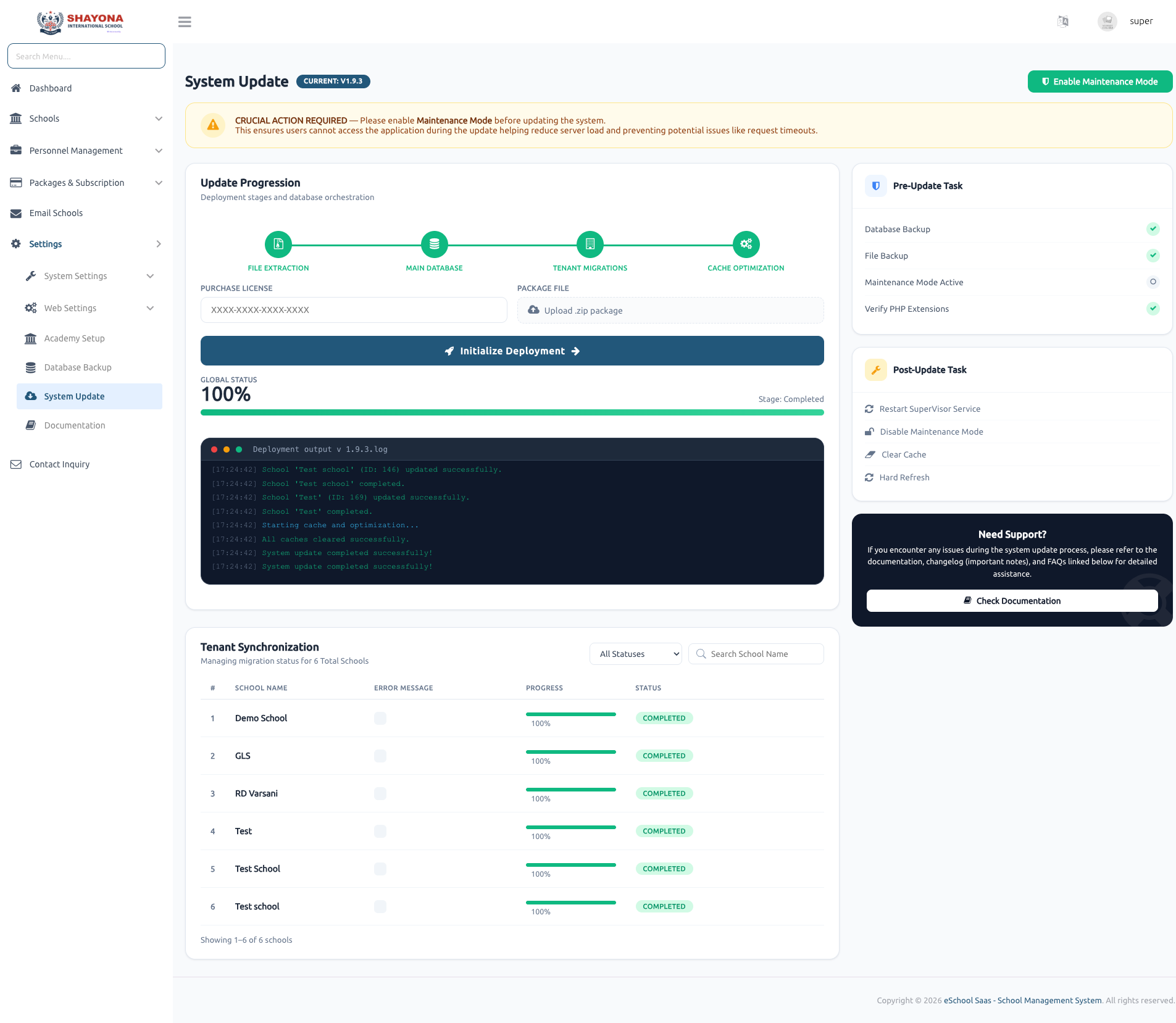
Update Process Overview
Super Admin can initiate a system update with a single action after providing the required inputs (Purchase Code and ZIP file).
- File Extraction: Core system files are extracted and replaced from the ZIP.
- Database Migrations: Applies changes to both main and tenant databases.
- Data Seeders: Executes seeders for required data updates.
- Architecture: Designed for multi-tenant architecture, ensuring consistent updates across all school databases.
Multi-Tenant Update Handling
Automatically applies updates to:
- Main (Central) Database
- Individual School (Tenant) Databases
- Executes school-specific migrations and seeders in the background, ensuring data consistency across all tenants.
Real-Time Progress Tracking
Displays live update progress using progress indicators for both:
- Global System Update Status
- Individual School-wise Progress Provides clear visibility into completed, ongoing, and pending updates.
Queue & Reverb Requirement
The update process depends on background job processing and real-time communication.
- Laravel Queue (Supervisor): Required for handling update jobs.
- Laravel Reverb (WebSocket): Required for real-time progress updates.
- Ensure these are properly configured to avoid tracking or execution failures.
Pre-Update Validation
The system performs critical checks before starting:
- Purchase code and ZIP file integrity validation.
- Server configuration and database permissions check.
- Queue worker and Reverb/WebSocket availability check.
Post-Update Verification
- Confirms all migrations and seeders executed successfully.
- Validates tenant database updates.
- Provides detailed success or failure status with logs.
System Safety & Reliability
- No Downgrade Support: Once updated, the system cannot be rolled back to an older version.
- Atomic Process: Ensures a consistent upgrade across all tenants.
- Pre-checks: Minimizes risk by preventing updates if requirements are not met.
Key Features
- One-click upgrade using purchase code and ZIP file.
- Multi-tenant database update support.
- Real-time progress tracking via WebSocket (Reverb).
- Background processing using Laravel Queue.
- Comprehensive pre and post-update validation.