Website Setup Locally
Configure files
Open the download web folder in a code editor like VSCode
.env file configuration
Copy .env.example to .env.local in your project root, then update the values below. .env.local is git-ignored — your real keys never get committed.
For each variable, only update the value after the = sign. Never change the variable name on the left.
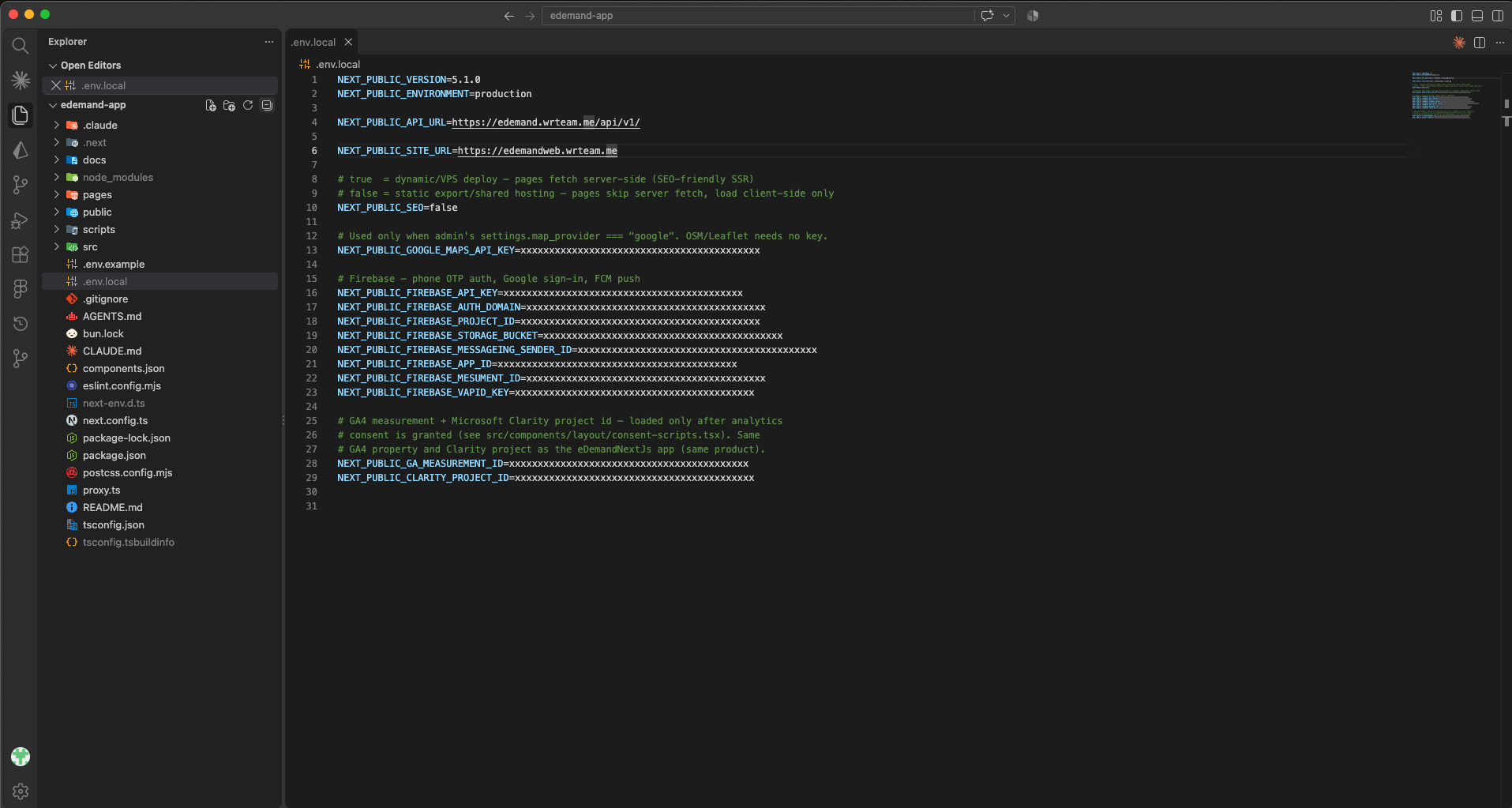
| Variable | What it's for | Where to get it |
|---|---|---|
NEXT_PUBLIC_API_URL | Backend API base URL the web app calls | Admin Panel → System Settings → API Key Settings → Client API Keys → API link for Customer App |
NEXT_PUBLIC_SITE_URL | This website's own deployed URL (used for canonical/OG/sitemap links) | Your domain, once deployed |
NEXT_PUBLIC_SEO | true = VPS/Node deploy with SSR, false = static export | See SEO for Web / Deployment Without SEO |
NEXT_PUBLIC_GOOGLE_MAPS_API_KEY | Map rendering — only needed if admin's map provider is set to Google | Google Cloud Console → APIs & Services → Credentials (enable Maps JavaScript API) |
NEXT_PUBLIC_FIREBASE_API_KEY, _AUTH_DOMAIN, _PROJECT_ID, _STORAGE_BUCKET, _MESSAGEING_SENDER_ID, _APP_ID, _MESUMENT_ID | Phone OTP auth, Google sign-in, FCM push | Firebase Console → Project Settings → General → Your apps → SDK setup and configuration |
NEXT_PUBLIC_FIREBASE_VAPID_KEY | Web push notification certificate | Firebase Console → Project Settings → Cloud Messaging → Web configuration → Web Push certificates → generate key pair |
NEXT_PUBLIC_GA_MEASUREMENT_ID | Google Analytics 4 tracking | Google Analytics → Admin → Data Streams → your web stream → Measurement ID |
NEXT_PUBLIC_CLARITY_PROJECT_ID | Microsoft Clarity session recording/heatmaps | Microsoft Clarity → your project → Settings → Setup → Project ID |
NEXT_PUBLIC_VERSION and NEXT_PUBLIC_ENVIRONMENT are internal build/deploy metadata — do not change these.
Analytics vars (GA_MEASUREMENT_ID, CLARITY_PROJECT_ID) only load after the visitor grants analytics consent — see src/components/layout/consent-scripts.tsx.
- Update the Application Name
The application name is no longer set via .env — it's now a code field. Open src/lib/site-config.ts and update the appName value:
appName: "eDemand",
appName is used throughout the app — page titles, the "Open in App" prompt, OTP/email copy, PWA manifest name, etc. See PWA Setup for how it ties into the install prompt.
- Website meta title, description, and keywords
These moved out of .env too — set them in src/lib/site-config.ts alongside appName:
title: "eDemand - Your On-Demand Service Booking Platform",
description: "eDemand connects you with trusted local service providers...",
keywords: ["on-demand services", "home services", /* ... */],