Sitemap Setup
A sitemap helps search engines discover and index all the pages on your website efficiently. This guide explains how to set up a sitemap for your eBroker web application.
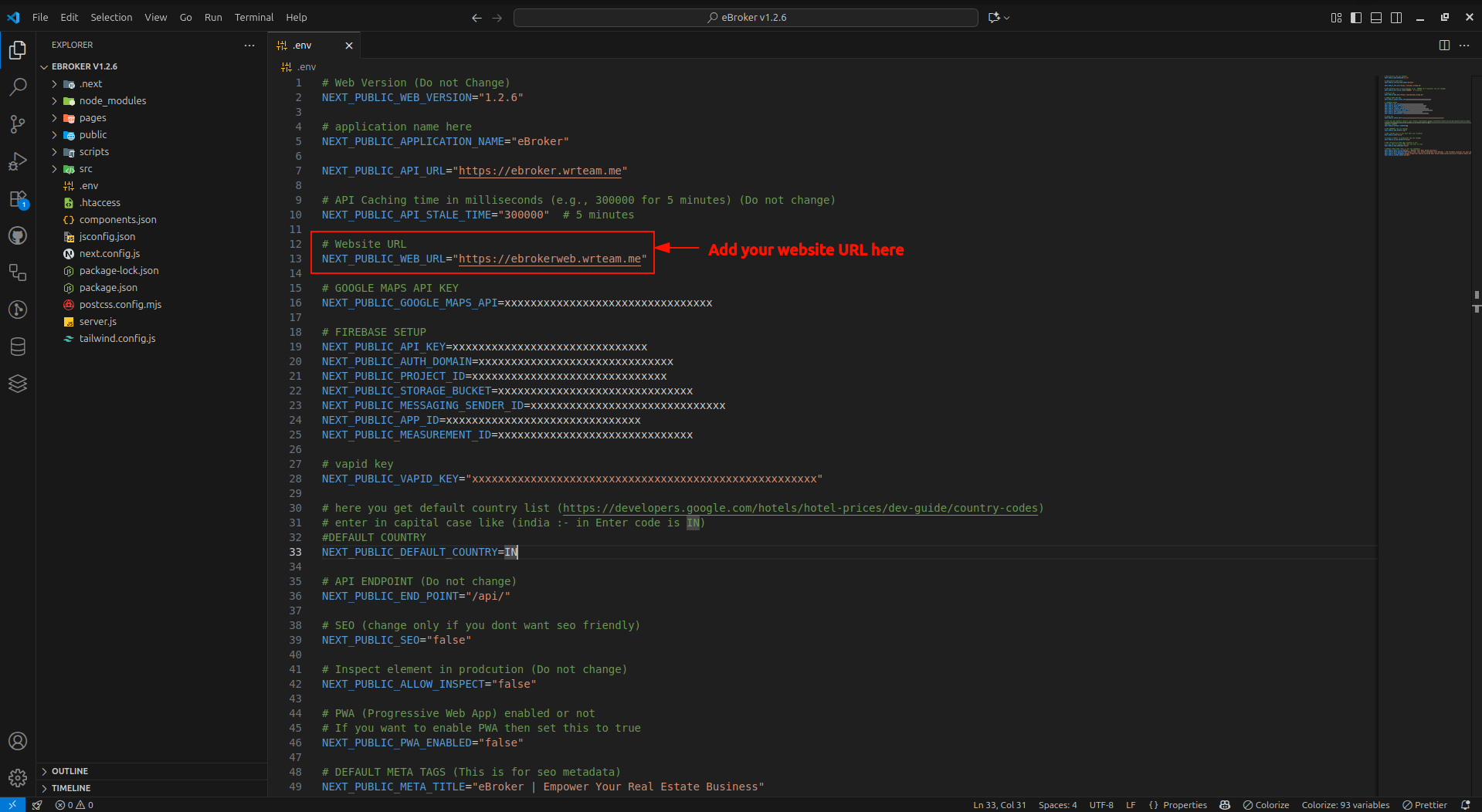
Configuring Your Domain for Sitemap
- Open the
.envfile in your project's root directory - Add your web domain or subdomain URL to the appropriate variable
How the Sitemap Works
The sitemap setup is automated via scripts/setup-sitemap.js and behaves differently depending on the NEXT_PUBLIC_SEO environment variable in your .env file.
1. Dynamic / SSR Mode (Recommended for VPS)
If NEXT_PUBLIC_SEO="true" is set in your environment:
- Behavior: The sitemap is dynamically generated at runtime.
- Mechanism: During the build process, the setup script deletes any static
public/sitemap.xmlfile (to avoid routing conflicts) and auto-restores/writes the dynamic route pagepages/sitemap.xml.js. - Outcome: Search engines and visitors fetching
/sitemap.xmlwill receive real-time database updates of properties and projects served via Server-Side Rendering (getServerSideProps). It also embeds visual stylesheet branding dynamically.
2. Static Mode (Recommended for Static Builds)
If NEXT_PUBLIC_SEO="false" or not set in your environment:
- Behavior: The sitemap is generated as a static XML file at build time.
- Mechanism: The setup script deletes
pages/sitemap.xml.js(preventing export errors) and runsscripts/sitemap-generator.jsto output a physicalpublic/sitemap.xmlfile containing all statically compiled pages. - Outcome: The sitemap is served as a plain static file directly from the filesystem.
Generating the Sitemap
Automated Generation (Build Time)
The sitemap configuration is integrated into the build process. When you run npm run build or npm run export, the setup script executes automatically:
# Defined in package.json build/export scripts
node scripts/setup-sitemap.js && next build
Manual Triggering
If you want to manually configure or regenerate the sitemap:
-
Trigger the Sitemap Setup Utility:
node scripts/setup-sitemap.jsThis reads your
.envsettings to decide whether to set up the dynamic SSR page or write a static sitemap file. -
Force-Generate a Static File: If you want to bypass the environment check and immediately output a physical static XML file to
public/sitemap.xml, run the generator script directly:node scripts/sitemap-generator.js
Customizing the Sitemap
If you want to customize the sitemap manually:
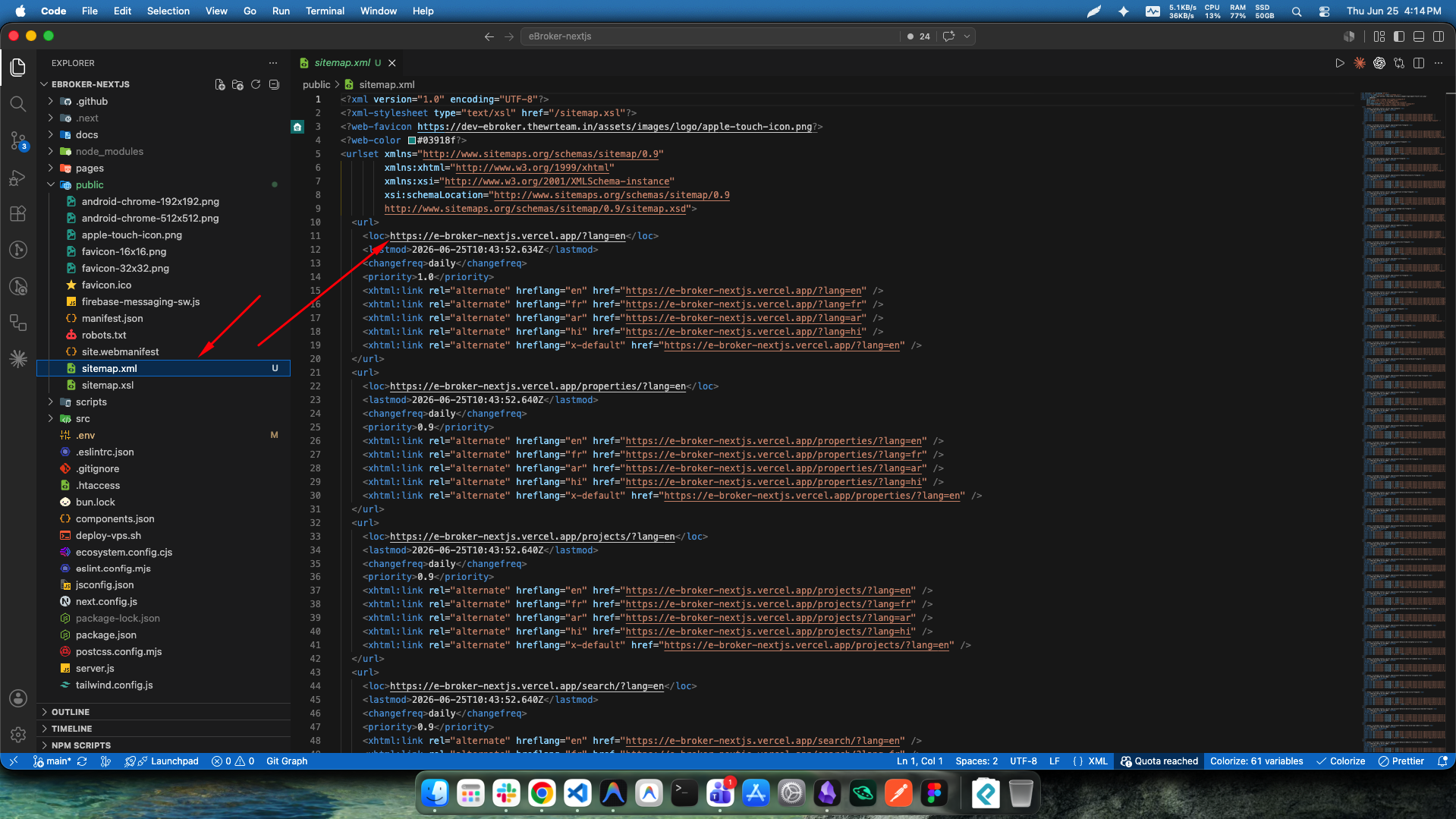
- Navigate to the
publicdirectory. - Open the
sitemap.xmlfile (only applicable in static mode, as dynamic mode is managed by the database and Next.js). - Modify the file according to your needs.
Sitemap Structure
A typical multilingual website sitemap follows this XML structure:
<?xml version="1.0" encoding="UTF-8"?>
<urlset xmlns="http://www.sitemaps.org/schemas/sitemap/0.9"
        xmlns:xhtml="http://www.w3.org/1999/xhtml"
        xmlns:xsi="http://www.w3.org/2001/XMLSchema-instance"
        xsi:schemaLocation="http://www.sitemaps.org/schemas/sitemap/0.9
        http://www.sitemaps.org/schemas/sitemap/0.9/sitemap.xsd">
  <url>
    <loc>https://yourdomain.com/?lang=en</loc>
    <lastmod>2025-11-14T06:24:51.039Z</lastmod>
    <changefreq>daily</changefreq>
    <priority>1.0</priority>
    <xhtml:link rel="alternate" hreflang="en" href="https://yourdomain.com/?lang=en" />
    <xhtml:link rel="alternate" hreflang="ur" href="https://yourdomain.com/?lang=ur" />
    <xhtml:link rel="alternate" hreflang="ar" href="https://yourdomain.com/?lang=ar" />
    <xhtml:link rel="alternate" hreflang="x-default" href="https://yourdomain.com/?lang=en" />
  </url>
   <url>
    <loc>https://yourdomain.com/properties?lang=en</loc>
    <lastmod>2025-11-14T06:24:51.040Z</lastmod>
    <changefreq>daily</changefreq>
    <priority>0.9</priority>
    <xhtml:link rel="alternate" hreflang="en" href="https://yourdomain.com/properties?lang=en" />
    <xhtml:link rel="alternate" hreflang="ur" href="https://yourdomain.com/properties?lang=ur" />
    <xhtml:link rel="alternate" hreflang="ar" href="https://yourdomain.com/properties?lang=ar" />
    <xhtml:link rel="alternate" hreflang="x-default" href="https://yourdomain.com/properties?lang=en" />
  </url>
  <!-- Additional URLs -->
</urlset>
Submitting Your Sitemap to Search Engines
After creating your sitemap:
- Deploy your website with the sitemap.xml file
- Submit your sitemap URL to search engines through their webmaster tools:
- Google Search Console: https://search.google.com/search-console
- Bing Webmaster Tools: https://www.bing.com/webmasters
- Yandex Webmaster: https://webmaster.yandex.com
Best Practices
For an effective sitemap:
- Keep it up to date with your latest content
- Include all important pages you want indexed
- Set appropriate priority and change frequency values
- Keep the file size under 50MB and fewer than 50,000 URLs (create multiple sitemaps if needed)
- Make sure the URLs in your sitemap actually exist and return 200 status codes