Point of Sale (POS) System
The Point of Sale (POS) system enables staff to process in-store customer orders quickly and efficiently, combining product browsing, cart management, payment processing, and order fulfillment in one interface.
Key Benefits
- Fast order processing with intuitive interface
- Multiple payment methods (Cash, Card, QR Code, Net Banking, Online)
- Flexible delivery options (Local Pickup, Door-Step Delivery)
- Real-time inventory tracking
Accessing POS
- Log in to your Admin Panel
- Navigate to POS from the main menu
- The POS interface will load with the product catalog
POS Interface Overview
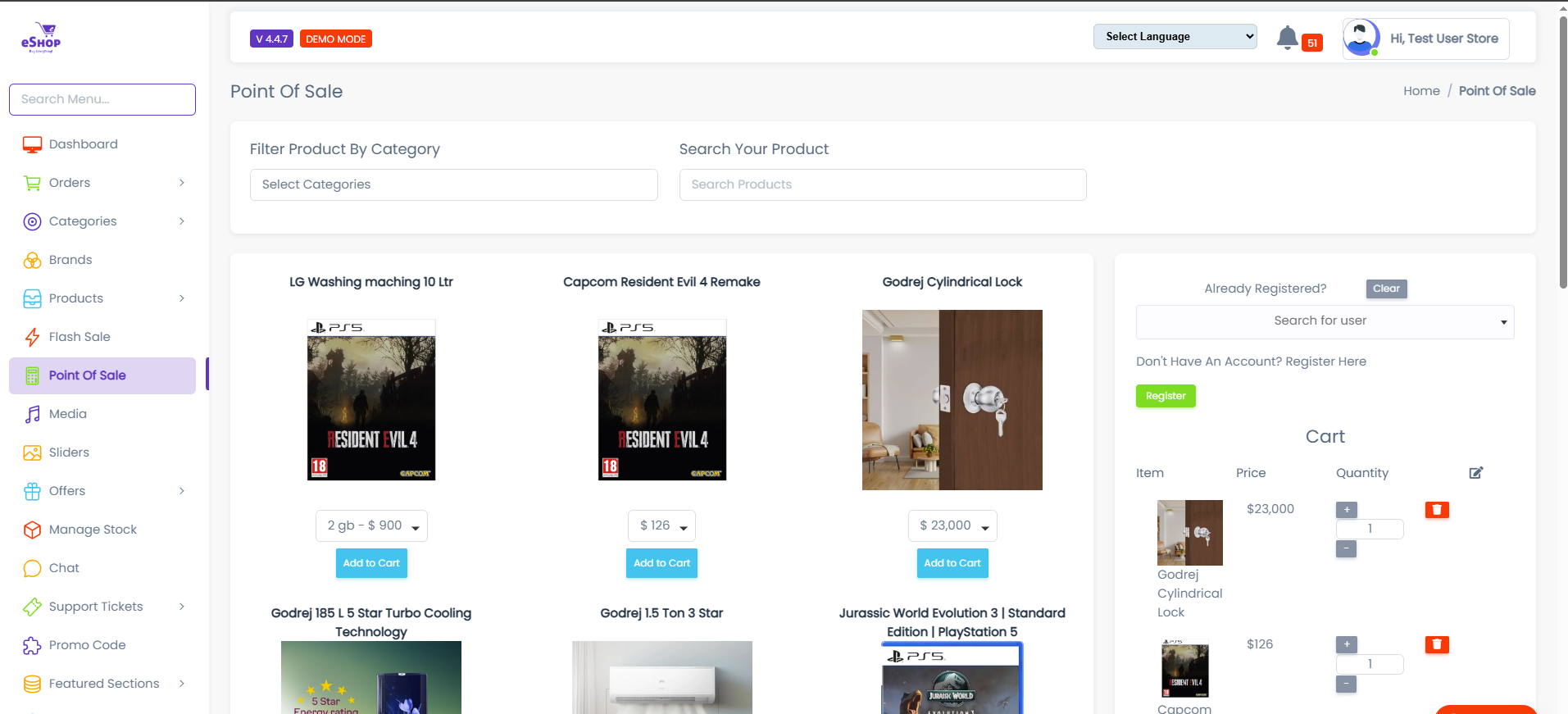
The POS system has three main sections:
1. Product Catalog (Left Panel)
Category Filter:
- Dropdown to filter products by category
- Located at top-left: "Filter Product By Category"
Product Grid:
- Displays products with images, names, prices, and variants
- Click "Add to Cart" to add items
Adding Products:
- Browse or use category filter to find products
- Select product variant if applicable (e.g., "2 gb - $ 900")
- Click "Add to Cart"
2. Customer Panel (Top-Right)
Existing Customer:
- Use "Search for user" dropdown
- Search by name, email, or phone
- Select customer from results
New Customer:
- Click "Register" button (green)
- Fill in customer details (name, email, phone, address)
- Save to create new customer account
Walk-in Customers
For customers who don't want to register, create a generic "Walk-in Customer" account or process as guest.
3. Shopping Cart (Right Panel)
Cart Management:
- Product Image & Name: Visual reference
- Price: Unit price per item
- Quantity Controls: Use +/− buttons to adjust
- Remove : Delete item from cart
Order Summary:
- Subtotal: Sum of all items
- Final Total: Total amount to pay (highlighted in red)
Delivery Type:
- Local Pickup: Customer collects from store (no delivery charge)
- Door-Step Delivery: Delivered to address (may include charges)
Payment Methods:
- Cash - Physical currency
- Card Payment - Credit/debit card via terminal
- Net Banking - Direct bank transfer
- Online Payment - Payment gateway
- Other - Store credit, vouchers, etc.
Action Buttons:
- Buy Now - Complete order and process payment
- Clear Cart - Remove all items