View Customers
Customers Overview
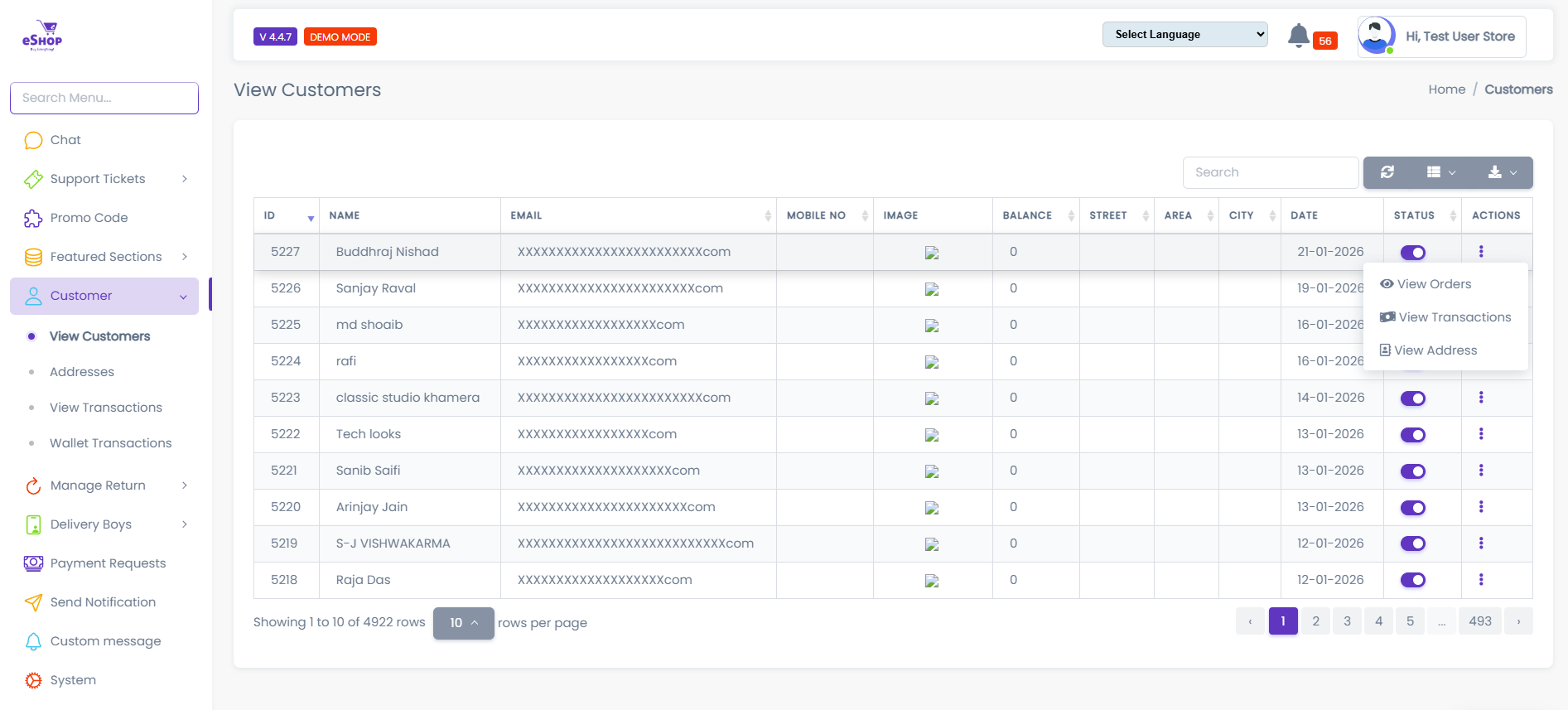
The View Customers page allows administrators to view and manage all registered customers on the platform.
It provides essential customer information, account status, and quick access to customer-related actions.
Customer List Details
Each customer record in the list displays the following information:
-
ID
A unique system-generated identifier for the customer. -
Name
The full name of the customer as provided during registration. -
Email
The registered email address used for login and communication. -
Mobile No
The customer’s primary contact number. -
Image
The customer’s profile image.
If no image is uploaded, a default placeholder is displayed. -
Balance
The current wallet balance available for the customer. -
Street
Street-level address details. -
Area
Area or locality associated with the customer’s address. -
City
City name linked to the customer profile. -
Date
The date on which the customer account was created. -
Status
Indicates whether the customer account is active or inactive. -
Actions
A dropdown menu providing customer-related management options.
Customer Actions
From the Actions menu, administrators can perform the following operations:
-
View Orders
View all orders placed by the selected customer. -
View Transactions
Access the customer’s wallet and payment transaction history. -
View Address
View all saved addresses associated with the customer. -
Enable / Disable
Activate or deactivate the customer account.
Search & Pagination
The customer list includes built-in tools to manage large datasets efficiently:
-
Search
Search customers quickly using their name or email address. -
Pagination
Navigate through multiple pages when customer records exceed the page limit. -
Rows Per Page
Control how many customer records are displayed on a single page.
Status Control
Customer account status affects platform access:
-
Active Customers
- Can log in to the platform
- Can place orders
- Can access wallet and services
-
Disabled Customers
- Cannot log in
- Cannot place orders
- Platform access is restricted
- Customer information is displayed in real time based on the database.
- Any changes made using the Actions menu take effect immediately.
- Only authorized administrators can manage customer accounts.